The $0–100/Month AI Stack for Filipino Virtual Assistants
Complete AI tool stacks for Filipino Virtual Assistants (VAs)—all under $100/month. Real peso costs, tested in Manila. No credit card required. Start with free-tier tools that work for VAs.
December 2, 2025

All USD-to-PHP conversions in this article use ₱55/USD for simplicity. Actual exchange rates may vary.
The $0–100/Month AI Stack for Filipino Virtual Assistants: Real Tools, Real Budget, Real Results
You don’t need a credit card to use AI. You don’t need fast internet, either.
I’ve spent the last 12 years in Manila watching some of the sharpest Filipino Virtual Assistants (VAs) work around the constraints everyone else complains about—slow WiFi, payment barriers, limited budgets. Not despite these limits, but because of them.
This week, I’m breaking down exactly what Filipino VAs actually use to stay competitive under real Manila conditions. Each stack costs under $100/month. Most cost far less.
And here’s what surprised me most: the VAs earning the most aren’t using the most expensive tools—they’re using the right tools for their constraints.
Navigating Tech and Budget Barriers: The Reality for Filipino VAs
The Gap Is Real
The numbers tell a story most tech blogs ignore. In the Philippines, less than 30% of adults have a bank account. Credit card penetration sits below 5%. Meanwhile, the average download speed in Metro Manila hovers around 25 Mbps on a good day—when PLDT or Globe aren’t having maintenance issues.
This isn’t about complaining. It’s about recognizing that the AI revolution everyone talks about has a different shape here—especially for Filipino Virtual Assistants (VAs).
When a tool requires a credit card, it eliminates 95% of potential VAs before they even try. When it demands stable high-speed internet, it becomes unusable during brownouts or when you’re working from a café in Quezon City. When it costs $20/month, that’s ₱1,100—more than many VAs spend on food in a week.
What I’ve Learned in 12 Years Here
I moved to Makati in 2013 with decades of IT experience and assumptions shaped by Tokyo’s infrastructure. Within months, those assumptions were worthless.
I watched VAs outperform me on projects while working from their phones during commutes on the MRT. I saw designers produce client work on 10-year-old laptops that would have been recycled in Japan. I met a content writer who built a six-figure-peso-per-month VA business without ever owning a credit card.
The lesson wasn’t about limitation. It was about optimization under constraints.
The Filipino VAs succeeding here aren’t waiting for better internet or cheaper tools. They’re making strategic choices about which tools solve real client problems versus which ones just look impressive on a features list. They’re asking: Does this save me time I can bill? not Does this have the most AI features?
That question—does this tool make me more pesos per hour as a VA—is what matters. And it’s the filter I’m using for everything in this article.
Four Affordable AI Tool Stacks for Filipino Freelancers (Under $100/Month)
")")
Stack #1: Writers & Content Creators (Filipino VAs Who Handle Writing Tasks)
The Person: Maria, Filipino VA Writer in Makati
Maria works from a small studio in Makati, landing $15–25/hour writing and content tasks for international clients—SEO articles, blog posts, newsletters, and client emails. She can handle 3–4 clients at once, but research eats up 40% of her billable time. She needs tools that speed up research and first drafts without killing her margins as a VA.
Her laptop is functional but not powerful. Her internet is Sky Fiber—25 Mbps down, 5 Mbps up, with occasional evening slowdowns. She has a BDO debit card, which works for some subscriptions but not others.
The Stack
Core Tool 1: ChatGPT Free + Perplexity Free
- Use case: Research, outline creation, fact-checking, headline variations
- Monthly cost: ₱0
- Effect: Cuts research time from 90 minutes to 30 per article. Perplexity handles quick fact checks; ChatGPT generates outlines and first drafts she rewrites in her own voice for clients.
Core Tool 2: Notion Free
- Use case: Client task tracking, content calendar, template library, SOPs
- Monthly cost: ₱0
- Effect: Replaces scattered Google Docs folders. All client info—briefs, style guides, past work—lives in one searchable workspace.
Supporting: Google Docs + Gmail Templates
- Use case: Final drafting and client collaboration; templated responses for common VA tasks
- Monthly cost: ₱0
- Effect: Clients can comment directly on drafts. Gmail templates save 15 minutes daily on repetitive VA communication—follow-ups, reminders, onboarding messages.
The Numbers
- Monthly total: ₱0–₱600 (if Maria upgrades ChatGPT later)
- Time saved: 8–12 hours per week
- Revenue impact: Extra 10 hours billed at ₱900/hour = ₱36,000/month added capacity
What Works, What Doesn’t
This stack excels for volume-based writing—SEO blogs, newsletters, descriptions. ChatGPT free covers 80% of tasks. Perplexity fills knowledge gaps needing fresh data.
What fails: Deep technical writing, legal/medical content, and highly voice-specific creative work—areas where AI drafts still feel generic.
The limitation isn’t the AI. It’s knowing when to stop using it and switch to your own expertise.
Stack #2: Video Creators & Motion Designers (For Filipino Freelancers)
The Person: Carlos, Phone-First Filipino Creator in Quezon City
Carlos creates YouTube content entirely on his smartphone—food reviews, neighborhood tours, Tagalog tech tips. He edits during MRT commutes, renders overnight when electricity is cheaper, and uploads at 3 AM when bandwidth is usable. He has no credit card, so paid AI tools aren’t accessible—but his channel still pulls 50,000 monthly views.
The Stack
Free Tier Essentials: CapCut Free + ChatGPT Free + Perplexity Free
- Use case: CapCut for editing/effects, ChatGPT for scripts/titles, Perplexity for trending topic research
- Monthly cost: ₱0
- Effect: CapCut handles cuts, transitions, subtitles, and text overlays with no watermark. ChatGPT generates 10–20 video title ideas instantly. Perplexity surfaces trending topics before larger creators notice them.
For Thumbnails: Canva Free + ChatGPT Prompts
- Use case: Thumbnail design, channel art
- Monthly cost: ₱0
- Effect: Canva Free provides optimized YouTube thumbnail templates. ChatGPT generates thumbnail concepts such as: Create a thumbnail with Carlos holding a plate of sisig and the text ‘BEST IN QC?’ in bold yellow.
For Ideas: NotebookLM (Google One) or Perplexity
- Use case: Script research, competitor analysis, content planning
- Monthly cost: ₱0 with Perplexity / ₱1,100 if using Google One
- Effect: NotebookLM analyzes competitor transcripts and finds content gaps; Perplexity finds trends. Planning time drops from 2 hours to 20 minutes per video.
The Numbers
- Monthly total: ₱0 (or ₱1,100 if using Google One)
- Trade-off: More time and creativity instead of monthly fees
- Real cost: 12–15 hours per video vs 8–10 with premium tools
Why This Works in Manila
Editing locally eliminates dependence on unstable Wi-Fi. CapCut runs offline. No cloud rendering. Uploads happen overnight when congestion is lowest. Total cost stays at data + electricity while creative control stays 100%.
Stack #3: Designers & Creative Professionals
The Person: Liza, The Canva Convert in Pasig
Liza used Adobe Creative Suite for years—until ₱2,700/month became impossible to justify with shrinking client budgets. She switched to Canva Teams, cut her design software costs by 90%, and immediately worked faster because she no longer needed to Google Photoshop tutorials just to finish a project.
The Stack
Primary: Canva Teams
- Use case: Social media graphics, presentations, pitch decks, simple logos, marketing materials
- Monthly cost: ₱299 (~$5)
- Effect: Premium templates, brand kits, and collaboration tools. Loads once, then edits smoothly even on slow Manila internet. No storage issues. Works on any device.
Secondary: ChatGPT Free
- Use case: Headlines, captions, copy, concept ideas
- Monthly cost: ₱0
- Effect: Produces 10–20 headline options instantly. Cuts revision cycles by half. Makes clients think she does copy and design.
Optional: Notion Free
- Use case: Client workspace, briefs, feedback notes, file links, timelines
- Monthly cost: ₱0
- Effect: Each client gets a clean, organized page. No lost files. No “Can you resend that?” messages.
The Numbers
- Monthly total: ₱299 (~$5)
- Quality comparison: 80–90% of Adobe quality for a fraction of the cost
- Client perception: No difference—professional output, delivered faster
Why Canva Wins in Manila
Canva’s interface lets designers focus on the work, not the software. The free tier is already strong; the paid tier feels like an investment, not a burden. Drafts save locally during outages, making it brownout-friendly. Because it’s browser-based, it runs on old laptops and even internet café PCs.
The limitation: Not ideal for advanced illustration or detailed photo manipulation—but perfect for 90% of client requests in the Philippines.
Stack #4: Virtual Assistants & Ops Managers
The Person: Ramon, Upwork VA Managing Five Clients
Ramon manages email, calendars, client communication, light bookkeeping, and project coordination for five clients at once. He earns ₱600–₱900/hour across multiple time zones. Organization isn’t optional—it’s survival. One missed deadline can mean losing a client instantly.
The Stack
Core: ChatGPT Free or Claude Free
- Use case: Email drafting, summaries, task lists, communication templates
- Monthly cost: ₱0
- Effect: A 10-minute email becomes a 90-second task. Meeting notes turn into clean action items. Five versions of a polite follow-up email appear instantly.
Organization: Notion Free
- Use case: Client hubs, task tracking, SOPs, templates
- Monthly cost: ₱0
- Effect: Each client gets a dedicated Notion page. Tasks, files, and communication history stay in one place. Switching clients takes seconds.
Communication: Gmail + Slack Free
- Use case: Formal communication + real-time updates
- Monthly cost: ₱0
- Effect: Gmail organizes long-form messages. Slack handles urgent check-ins. Both link cleanly into Notion.
Optional Upgrade: ChatGPT Plus
- Use case: Faster responses, priority access, advanced features
- Monthly cost: ₱1,100
- ROI: Saving 5 hours/month at ₱750/hour produces ₱3,750 value → nets ₱2,650 profit after the subscription.
The Numbers
- Free stack monthly total: ₱0
- Paid upgrade option: ₱1,100
- Capacity increase: 15–20% more tasks completed in the same hours
The Upwork Catch-22
Upwork limits proposal submissions on the free tier. To send more, you need a paid membership—but you need clients to afford it, and proposals to get clients.
Alternative: expand beyond Upwork. Build visibility on LinkedIn. Join active Facebook groups where clients post work. Use free AI tools to maintain a presence across multiple platforms at once.
The Elephant in the Room: Payment Barriers
Why Some Tools Don’t Work for Filipino VAs
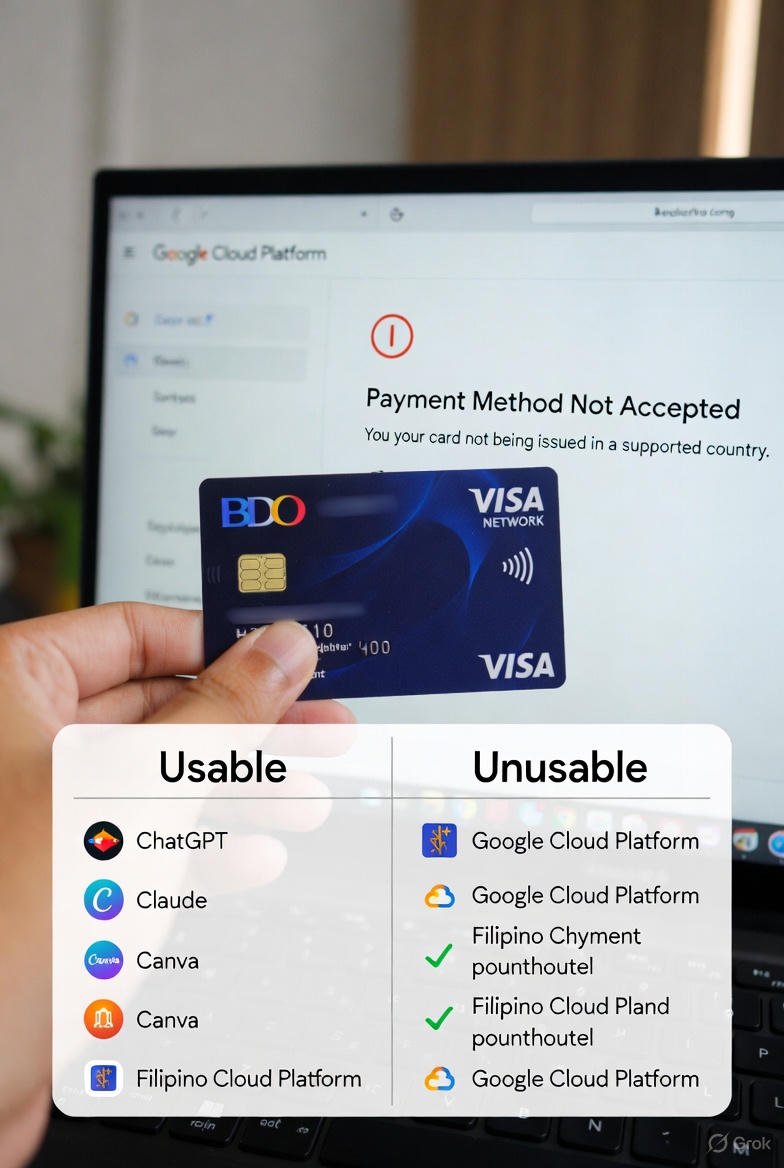
I use a BDO VISA debit card for most subscriptions. It works for ChatGPT, Claude, Microsoft 365, Google One, and Canva.
But it does not work for Google Cloud Platform (GCP).
This is not a small issue. GCP powers essential services—cloud APIs, machine learning tools, and the YouTube API.
If you’re a Filipino VA who wants to build tools that analyze YouTube channels, automate research, or access Google data, GCP’s payment wall stops you instantly.
This isn’t only my problem. Any Filipino VA using API-driven tools faces the same barrier. Stripe works for some platforms but not all. PayPal solves a few cases but not enough. And most Filipino VAs don’t have any credit card at all, making these platforms completely inaccessible.
Real Workarounds for Filipino VAs
Workaround #1: Use API Platforms That Accept BDO VISA
OpenAI’s API works. AWS works. Claude’s API works.
You lose Google-specific services, but you gain everything else you need for VA workflows.
Workaround #2: Use Local or Offline AI Tools
Run models locally using tools like LM Studio.
For video tasks, tools like FramePack process content offline with no monthly fees.
Workaround #3: Partner With Someone in a Region With GCP Access
They handle GCP billing; you handle development or execution.
It unlocks projects otherwise impossible to build alone.
What This Means for Your VA Budget
Payment barriers force smart optimization.
Tools you can’t access don’t drain your wallet. Your stack stays lean because you only pay for what works with Philippine payment methods.
The strategy is simple:
Build around the tools you can access—OpenAI, Claude, Canva, Notion.
All of them accept BDO VISA. All of them solve real VA problems.
Focus on what’s possible now, not what’s blocked behind payment walls.
How to Build Your Own Stack (5-Step Framework)
")
Step 1: Identify Your VA Work Type
Which describes your work best?
- Writer/Content Creator VA
- Video Editing VA
- Design/Canva VA
- General VA / Ops Manager
If you do multiple types, start with the one where AI will save you the most hours.
Step 2: Start With Free Tiers First
Every tool mentioned has a free version. Use each free tier for 30 days and track:
- how often you use it
- which tasks it actually replaces
- whether it saves real client time
If you don’t hit the free-tier limits, you don’t need the paid tier.
Step 3: Measure What Actually Matters
Track only the essentials:
- Tool + monthly cost (₱0–₱299–₱1,100)
- How often you use it
- Time saved (per task + monthly total)
- Peso value of time saved (hours × your rate)
Example:
20 hours saved × ₱750/hour = ₱15,000 value.
If the tool costs ₱299, keep it.
If it costs ₱1,100 but saves only ₱800 worth of time, cancel it.
Step 4: Upgrade Only After ROI Is Proven
Upgrade only when:
- you hit message or usage limits
- you need faster responses
- paid features save more time
- the math shows clear profit
Example ROI check:
₱1,100/month → saves 10 hours → 10 × ₱800 = ₱8,000 value.
Step 5: Review Every 3 Months
Every quarter, ask:
- Am I still using this weekly?
- Is it still saving enough time?
- Is there a cheaper alternative now?
Cancel anything that fails even one question. Redirect the savings into tools that earn more.
What I Got Wrong (And What I Learned)
The AI Video Tool Mistake
I expected AI video generators to be shortcuts. I tested Higgsfield.ai at $29/month, then Sora. The promise was simple: type a prompt, get a finished video.
The reality was frustration. Higgsfield produced clips that looked almost right but still wrong—odd camera angles, awkward pacing, and dozens of iterations that consumed credits too fast. With Sora, a single 30-second clip used up nearly an entire month’s credits.
What I learned: if you have ₱50,000/month for AI rendering, these tools might work. But on a Filipino VA budget, a smartphone plus CapCut will outperform expensive AI every time. Constraints force better storytelling. Rendering power cannot fix a weak concept.
Alternative: shoot locally, edit locally, upload when ready. It’s slower, but you control every frame.
The GCP Payment Wall
I wanted to build a YouTube analytics tool that identifies channels with low video counts but high subscriber growth—perfect for VAs supporting creators.
I mapped the workflow, created the API logic, and then hit the wall: GCP does not accept BDO VISA. Manual scraping violated YouTube’s TOS. The project stopped immediately.
What I learned: payment barriers are harder than technical ones. I can write the code, design the logic, build the UI—but I cannot bypass a blocked credit card field.
Next step: find a partner whose region supports GCP billing, or pivot toward projects that don’t need Google’s infrastructure. Frustration doesn’t build tools; adaptation does.
Why I’m Sharing These
Transparency matters. Successes teach what works. Failures teach what to avoid.
These weren’t small mistakes—I lost money, time, and momentum. But I learned where the real limits are, and which ones are worth working around.
Your constraints may differ. Your card might work where mine fails. Your internet may be faster or slower. Your clients may need different solutions.
But the framework stays the same: test small, measure honestly, upgrade only what proves its value, cancel what doesn’t.
The Real Question: Is AI Worth It for You?
If You Answer Yes to These:
- You spend 10+ hours per week on repetitive tasks
- You have 2–3 hours of internet access per day
- You bill by the hour or per project
- You’re willing to learn tools that save you time
- You have at least one payment method that works with ChatGPT, Claude, or Canva
If you checked three or more, AI tools will help you. Start with free tiers. Measure your results. Upgrade only after ROI is clear.
If You Answer No:
- Your work doesn’t involve writing, design, video, or organization
- Your client work is mostly manual and cannot be automated
- Your internet access is extremely limited
- You have no payment method for any subscriptions
- You prefer doing everything manually
Then don’t rush into subscriptions. Free tiers may help, but paid tools won’t change your workflow. Focus on doing what you already do best.
The Long Game
My goal is not to chase every new AI trend. It’s to build a foundation that lets me work from home, on one laptop, earning ₱50,000–₱100,000 per month sustainably.
AI tools are simply part of that foundation. They multiply output without multiplying hours. I can write faster, research deeper, manage more clients, and produce better work than I could alone.
That’s the long game: stable income from skills that age well, supported by tools that handle tasks machines do better than humans.
Whether you’re 25 or 55, the principle is the same: build systems that help you earn more in the same hours—or earn the same while working fewer hours. AI is one tool in that system, not the whole system.
Ready to Build Your Stack?
Paid subscribers get access to:
- Pre-built workflow templates for all four VA types
- Monthly Manila field test updates with new tool discoveries
- ROI tracking spreadsheets (coming soon)
- Priority support in our subscriber community
Note: This article uses fictionalized freelancer profiles for privacy. Tools, features, and prices reflect what was available at the time of testing. For the latest updates, always check each tool’s official website.

IT Engineer with 35+ years of experience, 12+ years in Manila
AI Engineer, Data Scientist, and Full Stack Developer based in Manila. Helping Filipino VAs succeed with AI-powered tools.